
NBI Clearance GCash payment lets you settle your clearance fee straight from your phone through the GCash Bills Payment feature, using the reference number generated after you book your NBI appointment online. No bank visit, no queue.
Why Pay Through GCash
Compared to visiting a bank or payment center, GCash offers a few concrete advantages for this specific fee:
- No queue: the entire payment takes a few minutes from your phone.
- Available around the clock, so you are not limited to banking hours.
- No cash handling, which lowers the risk of losing money in transit.
- Instant digital confirmation you can screenshot and keep.
- One app for both the payment and, later, checking your GCash transaction history if a dispute comes up.
The trade-off is that you need a verified account ready beforehand, which is why setting it up early matters if you are on a deadline.
What You Need Before Paying
- A completed NBI Clearance application with a reference number from clearance.nbi.gov.ph
- A verified GCash account. Unverified or basic-tier accounts cannot access Pay Bills.
- Enough GCash balance to cover the fee, plus a few extra pesos as buffer
- A stable internet connection
Your reference number and application ID are not the same thing. The application ID is created at registration. The reference number appears later, on the payment screen, once you choose GCash as your payment method. GCash needs the reference number, and you will also need it as your gate pass at the NBI branch on appointment day, so keep it safe even after paying.
Reference numbers expire around 24 hours after they are generated. Pay as soon as you get one. If you miss the window and pay anyway, your booking has likely already auto-cancelled. Save your payment slip and contact the helpdesk for a refund, then rebook for a new reference number.
If you are a first-time job seeker, check if you qualify for a free clearance under RA 11261 before paying anything.
Don’t Have GCash Yet
If you have not used GCash before, you can register and get it ready for your NBI Clearance GCash payment the same day. Setup takes a few minutes:
- Download GCash from the Play Store or App Store.
- Enter your mobile number and verify it with the OTP sent to you.
- Provide your basic personal details and set up your MPIN.
- Complete the KYC (Know Your Customer) verification by submitting a valid government ID and a selfie.
Your account must pass full verification before Pay Bills unlocks. This can take anywhere from a few minutes to a day or two, so if you are on a tight schedule, register early rather than at the last minute before your reference number expires.
NBI Clearance Fee for GCash Payment
- Base clearance fee: ₱130
- E-payment service fee: ₱25 to ₱30 depending on the channel
- Typical GCash total: ₱155 to ₱160
GCash’s own service fee tends to run slightly higher than other channels, which is why the GCash total is often a few pesos more than paying through 7-Eleven, Bayad Center, or online banking. Always pay the exact amount shown on your NBI payment screen, not a fixed number from any guide. If a site or person asks for noticeably more than this, treat it as a scam.
Note that this fee covers the standard, single-purpose NBI Clearance. If you are renewing and choosing the Quick Renewal option with door-to-door delivery, the total is different, generally landing between ₱355 and ₱430 depending on your location, since it includes a delivery fee on top of the renewal and e-payment charges. GCash can still be used for this option, just expect a higher total on your payment screen.
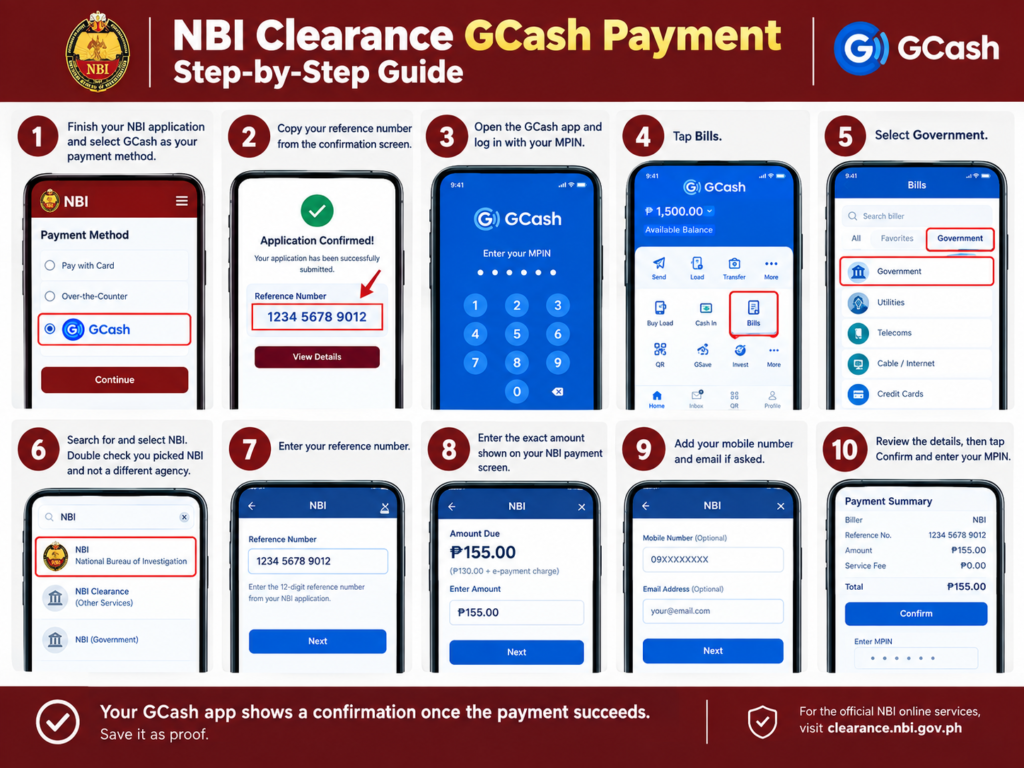
How to Complete NBI Clearance GCash Payment
- Finish your NBI application and select GCash as your payment method.
- Copy your reference number from the confirmation screen.
- Open the GCash app and log in with your MPIN.
- Tap Bills.
- Select Government.
- Search for and select NBI. Double check you picked NBI and not a different agency.
- Enter your reference number.
- Enter the exact amount shown on your NBI payment screen.
- Add your mobile number and email if asked.
- Review the details, then tap Confirm and enter your MPIN.
Your GCash app shows a confirmation once the payment succeeds. Save it as proof.
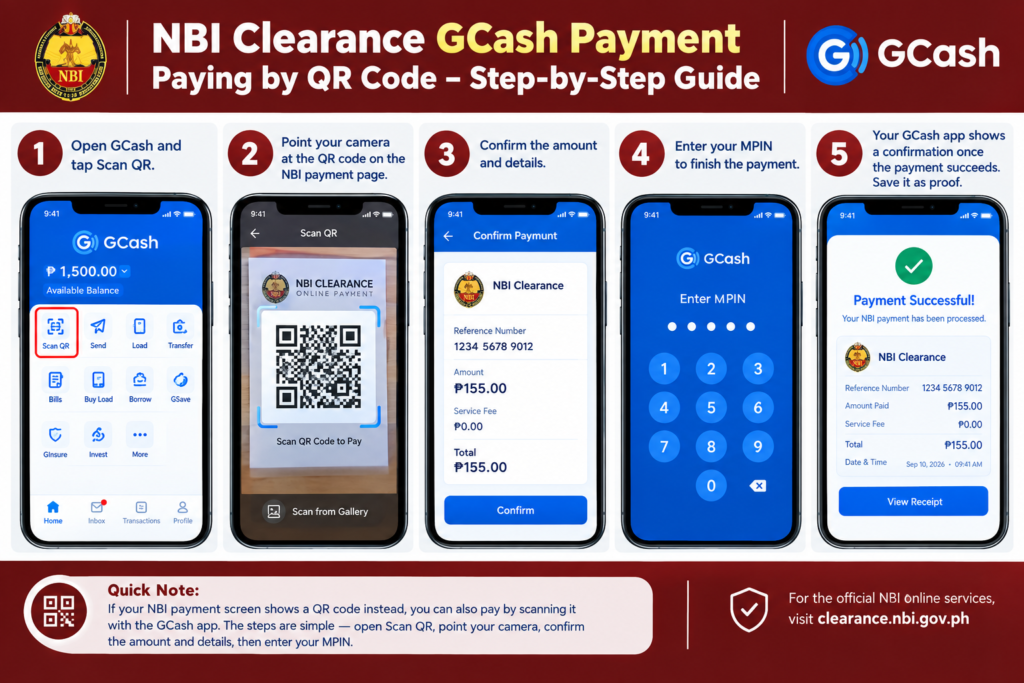
Paying by QR Code
If your NBI payment screen shows a QR code instead:
- Open GCash and tap Scan QR.
- Point your camera at the code on the NBI payment page.
- Confirm the amount and details.
- Enter your MPIN to finish.
How to Check If Your Payment Went Through
- Log in to your NBI account. Status should show PAID.
- Check GCash Transactions for a completed record under NBI as the merchant.
- Look for a confirmation SMS or email from GCash.
Give it 2 to 4 hours before assuming something is wrong. NBI status updates are not always instant, so a delay by itself does not mean your NBI Clearance GCash payment failed. Download and print your GCash receipt as well, some branches ask for a printed copy alongside your reference number.
Common Payment Errors and Fixes
| Issue | Likely Cause | Fix |
|---|---|---|
| Reference number rejected | Typo or expired code | Recheck digits or generate a new one |
| Payment not reflecting | System delay | Wait 2 to 4 hours, then check again |
| “Merchant Not Found” | Temporary GCash maintenance | Retry later or use another channel |
| Wrong biller selected | Picked a different agency | Verify NBI was selected before paying |
| Payment blocked | Monthly GCash limit reached | Try another channel, limit resets monthly |
| Double payment | Retry or lag | Contact GCash Support with both transaction IDs |
| Wrong reference number used | Typing error | Email the helpdesk, refund not guaranteed |
If your GCash balance was deducted but nothing reflects after 4 hours, email helpdesk@nbi.gov.ph with your full name, reference number, and a GCash transaction screenshot. Never pay twice out of panic. Check your GCash history first, and avoid rapid repeated retries within minutes of each other, since this raises the chance of a duplicate charge. There is no separate hotline for NBI GCash payment issues specifically, use GCash’s in-app Support chat for app-side problems, and the helpdesk email for anything tied to your application status.
Alternative Payment Channels
If GCash is not working, NBI accepts:
- 7-Eleven (CliQQ kiosk, Bills Payment)
- Bayad Center
- UnionBank
- Coins.ph
- Maya (PayMaya)
- ECPay
Your reference number works the same across all of these. No need to restart your application.
GCash vs Other Payment Channels
Each channel has its own trade-off, worth knowing before you pick one:
- GCash: Fastest option if your account is already verified. Pay anytime, no travel needed. Downside is the slightly higher service fee and occasional app maintenance windows.
- 7-Eleven (CliQQ kiosk): Good if you prefer paying cash and don’t mind a short trip. Available almost 24/7 in most areas.
- Bayad Center: Reliable for cash payments, widely available, but usually means standing in line during business hours.
- Online banking: Convenient if you already bank with a partner institution and prefer not to use an e-wallet.
- Maya: Functions almost identically to GCash if you already use it instead, with a comparable service fee.
If speed matters most and your GCash is already verified, GCash is generally the quickest path from application to paid status. If you are unsure your account is ready, check its verification status inside the app before your appointment day rather than discovering the issue at the last minute.
Cancellation and Refund Policy
Once your GCash payment goes through, the fee is non-refundable. You cannot cancel and get your money back. If your schedule no longer works, reschedule instead, subject to slot availability.
Common Mistakes to Avoid
- Entering the wrong reference number
- Paying an outdated amount instead of the figure on your current screen
- Closing the app before the confirmation loads
- Using a reference number from an old or expired application
- Paying again within minutes out of panic before the system has time to update
- Using a GCash account under a different name than your NBI application
- Paying late at night during GCash maintenance windows
- Paying an amount slightly off from what is shown, even by a peso. Overpayment and underpayment are both treated as invalid transactions.
Is It Safe to Pay NBI Clearance Through GCash
Yes. GCash is an official NBI payment partner, and NBI Clearance GCash payment is a recognized channel on the official portal. The real risk is fake websites copying the NBI payment page. Only enter your details through clearance.nbi.gov.ph or the official GCash app. Ignore payment links from text messages or social media ads. This applies even if a third-party fixer or agency helped you apply, payment still has to go through your own NBI reference number, so be cautious of anyone asking you to send money to a personal GCash number instead of the official NBI biller.
What Happens After You Pay
Once your NBI Clearance GCash payment reflects as PAID, you are not done yet, there are still a few steps left before you get your clearance:
- Go to your chosen NBI branch on your scheduled appointment date and time. Being early helps, since slots fill up and walk-ins are not guaranteed a spot.
- Bring two valid government-issued IDs, along with your reference number or a printed copy of your application form.
- Complete biometrics: your photo, fingerprint, and digital signature are captured on-site.
- NBI staff will show you your encoded information on screen. Check it carefully before confirming, since errors are harder to fix after printing.
- If your name comes back clear with no hits, you can usually claim your printed NBI Clearance the same day.
- If your name matches someone with a criminal record (a “hit”), you will be asked to come back on a later date while NBI verifies it is not actually you.
Paying through GCash only settles the fee. It does not replace the in-person biometrics step, which is still required for both new applications and renewals under the regular process.
After You Pay: Confirmation and Paperwork
Once your transaction succeeds, GCash sends an SMS confirmation right away, and NBI typically follows up with an email once your status updates to PAID. Treat either one as valid proof and save both if you receive them.
A printed application form is not strictly required at most branches if you paid online, but bringing a printed or saved copy of your reference number and payment confirmation is a good backup in case staff ask for it or their system is briefly down on the day.
If you need to switch NBI branches after you have already paid, this usually cannot be done through the portal itself. Contact your originally selected branch directly and ask them to transfer your record, since changing branches is not something you can self-serve online once payment is confirmed.
Occasionally, some applicants see a message saying their service fee has been waived, meaning only the base ₱130 clearance fee applies for that transaction. This is a limited-time promo, not a permanent policy, so do not expect it by default. Always pay whatever amount is actually shown on your payment screen rather than assuming a waiver applies to you.
Tips for a Smooth Payment Experience
A few habits make the whole process less stressful:
- Set a reminder to pay within an hour or two of getting your reference number, rather than leaving it for later in the day.
- Keep your GCash app updated to the latest version before you start, since older versions sometimes struggle with government billers.
- Take a screenshot of every screen: the reference number, the payment summary, and the final confirmation. Extra proof rarely hurts.
- If you are applying for a family member, confirm their exact reference number with them directly rather than relying on a forwarded screenshot that could be outdated.
- Avoid public Wi-Fi when entering payment details, and use mobile data or a trusted network instead.
- If your appointment is time-sensitive, pay immediately after getting your reference number rather than browsing away from the app first, since interruptions sometimes cause the session to reset.
Frequently Asked Questions
Conclusion
NBI Clearance GCash payment takes a few minutes: get your reference number, open GCash, go to Bills then Government then NBI, enter your details, and confirm before your reference number expires. Keep your receipt, watch your NBI status update, and only pay through official channels.